W-2 Box 14 Codes List: Important Codes You Need to Know
Box 14 on your W-2 can look simple until you see a short label that does not explain much. Maybe it says CASDI, PFL, MED PREM, FLSA OT Prem, or something your employer created for its own payroll system.
That is where a W-2 Box 14 codes list helps. It gives you a starting point, but not every entry works the same way. Some labels are only informational. Others may matter for state taxes, fringe benefits, local wages, benefits paid through payroll, or 2025 overtime reporting.
This guide walks you through the common Box 14 codes, what they may mean, and what you should check before you file. You’ll know when to enter the amount, when to ask payroll, and when to get tax help.
Quick answer
Box 14 on a W-2 is where your employer puts extra payroll details that don’t belong in the main wage or tax boxes. You may see state disability insurance, paid family leave, union dues, medical premiums, local tax details, fringe benefits, or 2025 overtime information. Don’t treat the code as the answer by itself. Use it as a clue, then check your final pay stub or ask payroll what the label means.
Key takeaways on W-2 Box 14 codes
- W-2 Box 14 codes are not fully standardized. Employers can use different labels for payroll items, benefits, state programs, and other W-2 details.
- Some Box 14 entries are only informational. They may explain deductions or benefits but may not change your federal tax return.
- Some codes may affect your state return. Labels like CASDI, NYSDI, PFL, VPDI, and similar state-related entries may matter when filing state taxes.
- Don’t assume every Box 14 amount is taxable or deductible. Some amounts may already be included in your wages, while others may simply explain payroll activity.
- Use a W-2 Box 14 codes list as a starting point, not the final answer. If a code is unclear, compare it with your final pay stub and ask payroll what the label means.
What is Box 14 on a W-2?
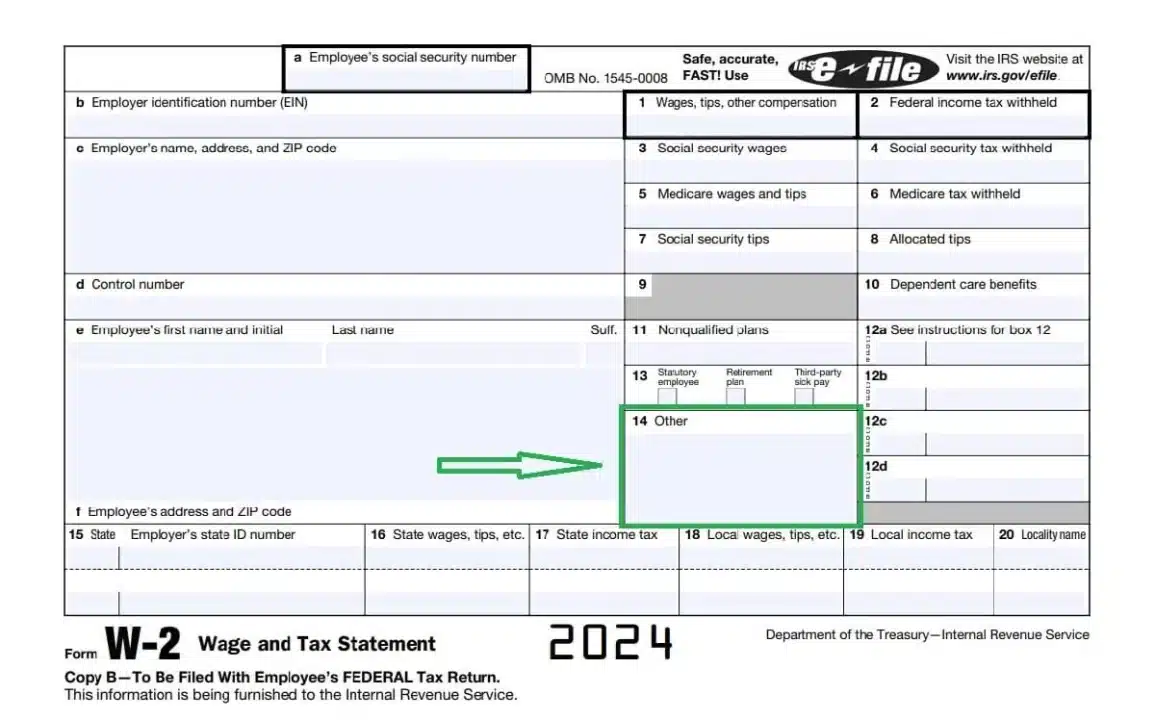
Box 14 on Form W-2 is an “other information” box employers use to report additional payroll details that do not fit neatly in the main wage, tax, or benefit boxes.
The IRS says employers may use Box 14 for other information they want to give employees, including state disability insurance taxes withheld, union dues, uniform payments, health insurance premiums deducted, nontaxable income, educational assistance payments, and minister’s parsonage allowance and utilities. See the IRS Form W-2 instructions for the official reporting guidance.
Starting with 2026 Forms W-2, Box 14 was split into Box 14a and Box 14b. Information that used to appear in Box 14, Other, generally appears in Box 14a, Other, while Box 14b is used for Treasury tipped occupation codes. But the purpose is generally the same: employers use it to report other payroll information that may help employees understand their wages, deductions, or benefits.
In plain English, Box 14 is where your employer may show helpful payroll details.
Common examples include:
- State disability insurance
- Paid family leave
- Union dues
- Uniform deductions
- Local tax information
- Health insurance premium deductions
- Educational assistance
- Clergy housing allowance
- Qualified overtime compensation information for 2025
The key point is this: Box 14 is not fully standardized.
That means two employers may use different labels for the same type of item. For example, California disability insurance might appear as CASDI, CA SDI, SDI, or something similar.
Why W-2 Box 14 codes matter
W-2 Box 14 codes matter because they can help you understand whether an amount on your W-2 is taxable, deductible, informational, or relevant to your state return.
Some Box 14 entries do not require any action. Others may help you complete a state return, claim a deduction, or confirm whether something was already included in your wages.
For example:
- CASDI may matter on a California return.
- NYSDI may matter on a New York return.
- Union dues may be useful for records, even if they do not create a federal deduction for many employees.
- Health insurance premiums may be informational or state-relevant.
- FLSA OT Prem or a similar overtime label may help you identify qualified overtime compensation for the federal overtime deduction.
Box 14 can also help you catch errors. If a deduction appears on your final pay stub but does not appear anywhere on your W-2, that does not always mean the W-2 is wrong. But it does mean you should slow down, compare the numbers, and ask payroll or HR what the label means.
Common W-2 Box 14 codes list
Here is a practical W-2 Box 14 codes list with commonly used labels. These codes are not universal. Your employer may use a slightly different abbreviation.
Because Box 14 labels are not fully standardized, the same code may not mean the same thing for every employer.
| Box 14 code or label | What it usually means | Possible tax impact |
|---|---|---|
| CASDI / CA SDI | California State Disability Insurance | May affect California state return |
| VPDI | Voluntary Plan Disability Insurance | Usually state-specific |
| NYSDI | New York State Disability Insurance | May be needed for New York filing |
| PFL | Paid Family Leave | Often state-specific |
| NJ SDI | New Jersey State Disability Insurance | May affect New Jersey return |
| WA PFML | Washington Paid Family and Medical Leave | State-specific payroll item |
| S125 / SEC125 / CAF125 | Section 125 cafeteria plan | Usually pre-tax benefit information |
| MED / MED PREM | Medical insurance premium deduction | Usually informational or state-relevant |
| UNION | Union dues | Usually informational for federal purposes |
| UNIF / UNIFORM | Uniform payments or deductions | May be informational or employer-specific |
| EDU / EDUC ASST | Educational assistance | May be taxable or nontaxable depending on the facts |
| GTL | Group-term life insurance information | May relate to taxable fringe benefits |
| IMP / IMP INC | Imputed income | Usually taxable if included in wages |
| AUTO | Personal use of company vehicle | Often taxable fringe benefit |
| HOUSING / PARSONAGE | Clergy housing allowance | Special tax treatment |
| LOCAL | Local tax or local wage information | May affect local or state filing |
| FLSA OT Prem / OT-NT / OT Deduct | Possible qualified overtime compensation label | May support the 2025 overtime deduction |
This table is not a substitute for your employer’s payroll code key. If the code is unclear, ask HR or payroll for the exact meaning.
When Box 14 usually matters most
Box 14 usually matters most when the entry relates to state taxes, local taxes, taxable fringe benefits, paid family leave, disability insurance, or qualified overtime compensation.
In many cases, the entry is only informational. But if the amount affects wages, state reporting, local taxes, or a deduction, it is worth reviewing before you file instead of correcting the return later.
Pay extra attention to Box 14 entries when:
- You moved or worked in more than one state
- You see state disability or paid family leave labels
- You received taxable fringe benefits
- You worked overtime in 2025
- Your tax software asks you to classify the Box 14 amount
- The amount does not match your final pay stub
How W-2 Box 14 codes affect your tax return
Not every Box 14 entry changes your tax return. Some entries are there only to explain something. Others may matter for state taxes, local taxes, or a specific deduction.
Here is the simplest way to think about it.
Some Box 14 codes are informational only
Some entries help you understand your payroll but do not require a direct federal tax entry.
Examples may include:
- Health insurance premium deductions
- Charitable payroll deductions
- Union dues
- Certain employer benefit labels
- Internal payroll descriptions
You should still keep the information. It may help if you compare your W-2 to your final pay stub or if your tax software asks about the entry.
Some Box 14 codes affect your state return
State-related items are one of the most common reasons employers use Box 14.
Examples include:
- CASDI
- VPDI
- NYSDI
- NJ SDI
- PFL
- WA PFML
These entries may not change your federal tax return, but they can matter when you prepare your state return. Not every state treats these entries the same way, and some states may not use these labels at all. Tax software often asks you to identify the type of Box 14 entry so it can handle the state treatment correctly.
Some Box 14 entries explain taxable fringe benefits
A taxable fringe benefit may be included in your wages, but Box 14 can show the detail behind it.
Examples may include:
- Personal use of a company car
- Imputed income
- Certain life insurance-related amounts
- Certain housing or allowance items
Do not assume the amount is separate income that needs to be added again. First, check whether it was already included in Box 1 wages.
Some Box 14 entries may support a deduction
Some Box 14 entries may help support a deduction or adjustment, depending on the law, the tax year, and your facts.
A timely example is qualified overtime compensation.
For tax year 2025, employers are not required to separately report qualified overtime compensation on Form W-2, but some employers may choose to report it in Box 14, through an online portal, or on a separate statement.
Box 14 is not automatically a tax deduction
A Box 14 amount does not automatically mean you can deduct it. Some entries are already reflected in your taxable wages. Others are only there for state reporting, payroll explanation, or employee records.
Before treating a Box 14 amount as deductible, check what the label means, whether it was pre-tax or after-tax, and whether your tax software asks for it.
2025 overtime deduction and Box 14
For tax years 2025 through 2028, certain individuals may be able to deduct qualified overtime compensation. The IRS explains that the deduction generally applies to the overtime pay that exceeds the regular rate of pay, often the “half” portion of time-and-a-half compensation required under the Fair Labor Standards Act.
For example, if your regular pay is $30 per hour and your overtime rate is $45 per hour, the extra $15 per hour may be the overtime premium portion. That premium portion is the amount you would want to identify if your employer provides a Box 14 label, separate statement, payroll portal report, or final pay stub detail.
For 2025 W-2s, you may see labels such as:
- FLSA OT Prem
- OT-NT
- OT Deduct
- Qualified OT
- OT Premium
- Overtime Prem
The exact wording may vary by employer.
For tax year 2025, Forms W-2 were not updated for these new overtime reporting rules, and the IRS provided 2025 transition relief. Some employers may report qualified overtime compensation in Box 14, on a separate statement, through a payroll portal, or not separately at all.
Also, the overtime deduction is a deduction. It is not the same thing as excluding overtime from your W-2 wages. Social Security and Medicare taxes may still apply.
How to handle W-2 Box 14 codes
Use this process before you enter Box 14 information into your tax software.
1. Read the exact label
Start with the exact abbreviation shown on your W-2. Do not guess based only on the first letter.
For example, “PFL” may mean paid family leave, but the tax treatment depends on the state and the employer’s reporting.
2. Compare it to your final pay stub
Your final pay stub and tax documents may show the same item with more detail. Look for year-to-date totals for benefits, deductions, local taxes, overtime premiums, or state programs.
If the number matches, you have a better starting point.
3. Ask payroll or HR for the code key
This is often the best answer. Box 14 labels are employer-created, so your payroll department may be the only place that can explain a custom abbreviation with certainty.
Ask: What does this Box 14 code mean, and is it pre-tax, after-tax, taxable, or informational?
That one question can prevent a lot of confusion.
4. Do not double-report income
If Box 14 shows imputed income, company vehicle income, or another taxable benefit, it may already be included in the Box 1 of the W-2.
Do not add it again unless your tax software or tax professional tells you to do so.
5. Keep a copy with your tax records
Even if the Box 14 amount does not change your federal return, keep your W-2, final pay stub, and any employer explanation with your tax records.
If a state agency, tax software, or tax professional asks later, you will have the backup.
Common mistakes to avoid with W-2 Box 14 codes
Box 14 mistakes usually happen because the codes look more official than they really are. Some are official-looking payroll labels, but not every label has the same tax treatment.
Avoid these common mistakes:
- Assuming every Box 14 amount is taxable. Some entries are informational or already included in wages.
- Assuming every Box 14 amount is deductible. A label does not automatically create a deduction.
- Ignoring state-specific entries. CASDI, NYSDI, PFL, and similar items may matter for state filing.
- Double-counting taxable benefits. If imputed income is already in Box 1, adding it again can overstate income.
- Skipping payroll clarification. Your employer may use a custom label that no online list can fully explain.
- Missing 2025 overtime support. If you qualify for the overtime deduction, look for Box 14, a separate statement, payroll portal details, or final pay stub information.
What if you do not understand a Box 14 code?
If you do not understand a Box 14 code, contact your employer first. Your employer created or selected the label, so payroll or HR is usually the best source.
You can ask: I’m reviewing Box 14 on my W-2. Can you explain what this code means, whether the amount is taxable or informational, and whether it was already included in Box 1 wages?
If the amount affects your federal or state return and you still are not sure how to report it, ask a tax professional before filing.
That is especially important if the code relates to:
- Imputed income
- Company vehicle use
- Clergy housing
- State disability or paid leave
- Local wages or local taxes
- Qualified overtime compensation
- Corrected W-2 issues
FAQs about W-2 Box 14 codes
What does Box 14 mean on a W-2?
Box 14 is the “other information” area of Form W-2. Employers use it to report extra payroll details such as state disability insurance, union dues, health insurance premiums, educational assistance, local tax information, or other benefit-related items.
Do I have to enter Box 14 on my tax return?
Sometimes. Some Box 14 entries are only informational, while others may affect your state return or help support a deduction. If your tax software asks for the item, choose the category that best matches the code. If you are not sure, ask your employer what the code means.
Are W-2 Box 14 codes taxable?
Not always. Some Box 14 entries are taxable, some are already included in your wages, and some are only informational. Do not assume the amount is taxable just because it appears in Box 14.
Why are W-2 Box 14 codes different for every employer?
Box 14 is flexible. Employers can use their own labels to explain payroll deductions, benefits, state taxes, local taxes, or other information. That is why one employer may use “CASDI” while another uses “CA SDI” for a similar item.
What does CASDI mean in Box 14?
CASDI usually means California State Disability Insurance. It is a California payroll deduction and may matter when preparing a California state tax return.
What does PFL mean in Box 14?
PFL usually means Paid Family Leave. The tax treatment can depend on the state and the way the employer reported it. Check your state return instructions or ask a tax professional if you are unsure.
What does FLSA OT Prem mean in Box 14?
FLSA OT Prem usually refers to the premium portion of qualified overtime compensation. For 2025, some employers may choose to report qualified overtime compensation in Box 14, through a separate statement, or through an online portal.
What should I do if my Box 14 code is not on any list?
Ask your employer or payroll department for the code key. Because Box 14 labels can be employer-created, an online W-2 Box 14 codes list may not include every possible abbreviation.
Final thoughts on W-2 Box 14 codes
W-2 Box 14 codes can look confusing, but most entries fall into a few categories: state payroll items, benefit deductions, informational entries, taxable fringe benefits, or employer-created labels.
The safest approach is to read the exact label, compare it to your final pay stub, and ask payroll for the code key when the meaning is unclear. Don’t assume every Box 14 amount is taxable, deductible, or already handled correctly.
A good W-2 Box 14 codes list can point you in the right direction, but your employer’s explanation and your actual W-2 details matter most. If the code affects wages, state taxes, fringe benefits, or overtime, it is worth reviewing before you file instead of correcting the return later.
H&S Accounting & Tax Services can help review unclear W-2 entries before you file.